Personal Vendee Avatar — the user guide
A shopping agent that works for you, on your own computer.
Meet your Avatar: a personal shopping assistant that lives on your laptop, hunts down what you want across loads of different stores, and never sells you out to advertisers. You stay in charge of your money, your data and your rules. This guide walks you through what it does and how to use it.
The short version: you chat to it like a person, it does the shopping legwork, and you make the final call. Nothing leaves your device except the search itself, and even that doesn't carry your name.
What is it, really?
Personal Vendee Avatar is a single app you download to a Mac with Apple silicon (Windows and Linux builds are in development). The clever part — the AI — runs locally, on your machine, instead of in someone's cloud. So your preferences, your history and your shopping list stay with you.
There are two sides to it. Your Avatar is the permanent 'you' — your tastes, sizes, budget and rules. The Shopping Agent is the helper that spins up whenever you want to shop, does the task, then bows out. Think of the Avatar as your profile and the Agent as the runner you send to the shops.
Why it's different from just googling
Big shopping assistants make their money from ads, sponsored placement and knowing everything about you. This one doesn't. It only takes your side.
- No ads and no paid placement — results are ranked on what's actually best for you, not who paid to be there.
- Your data stays on your computer, not in a cloud profile someone can sell. No creepy ad-stalking after you glance at one pair of trainers.
- It earns its keep in small, behind-the-scenes ways — a referral fee from a store, or a small share of the payment processing fee when you buy (the fee the store pays to process a card, not an extra charge to you). Never from ads.
- Whichever way it earns, that money is walled off and can never change what it recommends, and it never adds to the price you pay. You'll see a plain note when a referral applies.
Getting started
You install one file. A friendly chat-style setup wizard checks your computer can run it, sets up your secure storage, and gets the local AI ready. There are no separate accounts to create, no add-ons to hunt down, and nothing to configure by hand. When it's done, the app opens and you can start shopping — genuinely one tap and you're in.
Heads up: because the AI is bundled in, the download is a few gigabytes. That's the trade for having everything run privately on your own machine.
Setting up your Avatar
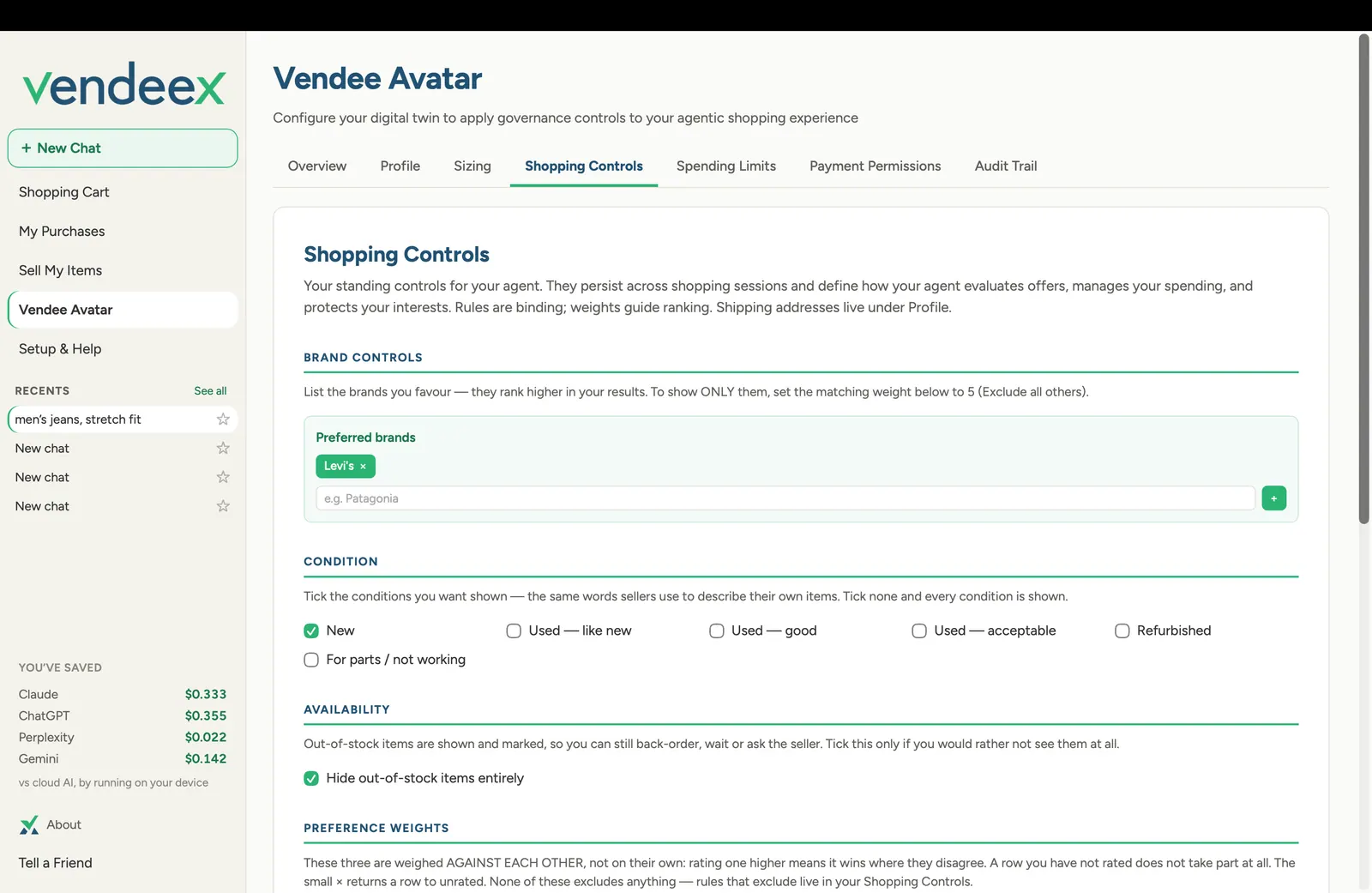
Your Avatar holds your preferences: the brands you like, your sizes, delivery region, and how much you care about price versus quality. The more you tell it, the sharper its picks — and the less time you spend filling in the same details on every site. All of this is sealed and encrypted on your device. It's yours, and it carries your taste around for you.
Setting your rules (spending limits & guardrails)
You set the boundaries and the app sticks to them, every time. Set a budget, per-item and monthly caps, brands or categories to allow or block, and how much freedom the Agent has to act on its own. Every decision is checked against your rules before anything happens — and it's the same result every time, so there are no surprises and nothing goes over the line you draw.
Within your limits, the Agent can do useful things unattended — like watch for a price drop or a restock and line up the cart — but you always make the actual purchase.
Shopping: searching across stores
Tell the Agent what you're after, in normal words. It searches across many merchants and platforms at once, filters out things that can't actually be delivered to you, and ranks the rest on what fits you best — need, total cost, terms and your own preferences. Instead of you opening fifteen tabs and price-checking by hand, it does the digging and hands you a tight shortlist of the best few.
Your cart
Everything you pick lands in one cart on your device — even if the items come from different shops. It's grouped by store, so you can see exactly what's coming from where. Think of it as a single list that spans the whole internet, not just one retailer's basket, so you're never juggling a dozen separate checkouts to keep track of what you're buying.
Buying an item
When you're ready, you hit buy on an item (or a store's group of items) and the app hands you over to that shop's own checkout to pay. You complete the payment there, then pop back to your cart for the next thing. The Agent never takes your money or pays on your behalf — you're always the one who clicks 'pay', and your card details go to the actual store, not to a middle-man app.
When it hands you over, it passes only what's needed to complete the order — and only the details that shop actually requires, nothing more.
Selling your own stuff
Think of the Sell space as an AI-powered garage sale. You create and publish a listing for something you own, right from the same app, with no new account to set up. Your listings are stored privately and securely on your device, just like everything else.
Payment works the way it does on Facebook Marketplace: the buyer and seller sort it out directly between themselves. The app is the place you list and connect — it doesn't sit in the middle of your money, take a cut of the sale, or hold anyone's card details. That's by design, not a missing piece.
Your purchase record
The app keeps a private, tamper-proof log of your shopping — what you considered, why it chose what it did, what you bought, from whom and for how much. It's signed with a key on your device, so it's provably yours and can't be quietly altered. It's a personal receipt book that actually belongs to you — handy for returns, warranties, budgeting, or just keeping proof of what you bought, without depending on a retailer's account that might one day vanish.
Your privacy & security
The rule is simple: your identity, preferences, history, cart and record live on your device and stay there. Your searches leave to find products, but they don't carry your name. The only time personal details go out is when you buy something — and then only the minimum that shop needs to ship it to you, shared by your own action.
Two small things do come back to us, and we'd rather say so than let you find out: a note from the store's affiliate network when a referral leads to a sale (which store, how much, when, and a reference), and a count of how many searches your install makes, so we can manage costs and stop abuse. Neither one tells us what you searched for, what was in your basket, or who you are.
- Data is encrypted on your machine and unlocked by your fingerprint or passcode.
- Each shop only ever sees its own order — never the rest of your cart.
- The company behind it runs only a thin 'broker' in the background to reach the stores. It holds no identity, no history, no cart and no record — the most it ever knows is that an install ran a search, or that a referral led to a sale.
Good to know (this release)
The app is honest about what's ready today and what's still landing:
- Payments are 'assist-only': you always pay at the store's own checkout. Fully hands-off automatic payment is a future option.
- Selling is an AI garage sale: you list and connect, and buyer and seller arrange payment directly, like Facebook Marketplace.
- The smoothest 'express' checkout works store-by-store as each retailer is connected — everywhere else, the standard hand-off already works.
- A phone version is planned for later, once phones can run the AI locally the way laptops can.
Quick FAQ
Does it cost me my data?
No. Your data stays on your computer. What leaves is an anonymous search and, when you buy, the delivery details that shop needs. Two smaller things reach us: a count of how many searches your install runs (never what's in them), and a note when a referral leads to a sale — which store, how much, when. Never your name, your basket or your card.
Can it spend my money without asking?
No. You complete every payment yourself, at the store. Within your limits it can prepare things (like watching for a price drop), but the buy is always your click.
How does it make money — and does it cost me?
In two small ways, both aimed at covering costs, never from ads. It may earn a referral fee from a store, and it may take a small share of the payment processing fee when you buy (that's the fee the store already pays to process a card, not an extra charge added to you). Neither adds to your price, and both are walled off so they can't influence what it recommends.
Do I need an account?
No separate accounts to create. You install the app and go.
Why is the download so big?
The AI is bundled in so it can run privately on your machine. That's the trade for keeping everything local.